
Choose Which Countries Can Buy Your Products
Set country restrictions for non-shipped products and review destinations supported by physical-product shipping options.
Control where customers can buy your products. Non-shipped products use a store-wide country list. Physical products use the destinations supported by your shipping options.
Restrict non-shipped products
This setting applies to digital products, services, gift cards, donations, and memberships.
- Open your site's Commerce dashboard.
- Select Store Experience.
- Turn on Restrict Non-Shipped Products to Specific Countries.
- Under Available Countries, select the countries you want to allow. Review the entire list before saving.
- Select Save and republish if prompted.
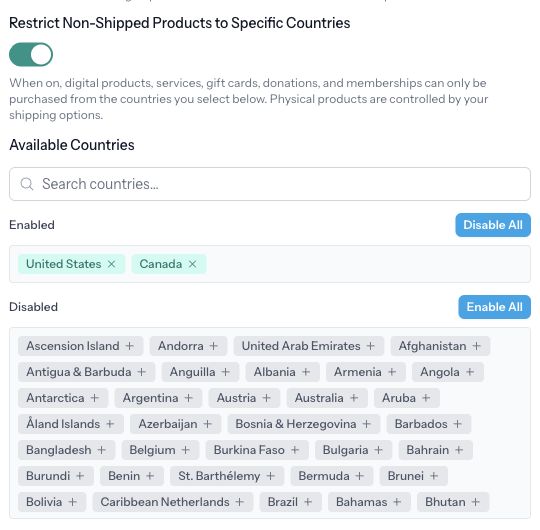
To remove this store-wide restriction, turn the setting off and save. This does not change your physical-product shipping destinations.
Set destinations for physical products
- Open Fulfillment.
- Under Shipping & Pickup Rates, edit a manual shipping rate or select Add Rate to create one.
- Review Available Shipping Countries and enable the destinations this option should serve.
- Check its price, order-value limits, and any container restrictions.
- Save the rate. Repeat for every shipping option customers can choose.
A manual shipping option needs at least one supported country. Several options may serve the same country, so review all of them when removing a destination.
For Live rates via Shippo, carrier availability and the customer's address determine whether a rate is offered at checkout. Follow Set Up Live Shipping Rates with Shippo to configure carriers, services, and containers.
Check availability before announcing it
Review checkout with representative allowed and excluded destinations, without completing a payment. Check both a non-shipped product and a physical product if you sell both.
If a customer cannot buy a physical item in an intended destination, review the shipping option's country list, order-value limits, and container requirements. A country being selected does not guarantee that a live carrier can quote the shipment.
If a non-shipped product is unavailable, check this country restriction as well as the product's availability and any quantity limit. Digital products also need an uploaded file. See Sell Digital Downloads.