
Set Up Live Shipping Rates with Shippo
Connect Shippo, define shipping containers, and offer carrier-calculated rates at checkout.
Shippo provides live carrier quotes based on the destination and shipment. A complete setup needs a Shippo connection, an origin address, product shipping data, containers, and a live-rate option.
Connect Shippo
- Open Commerce → Fulfillment.
- Under Shipping Integrations, choose Connect Shippo.
- Complete the connection with your Shippo account and return to Articulation.
- Review the available carriers and services. Refresh carrier information if you have changed the carriers connected in Shippo.
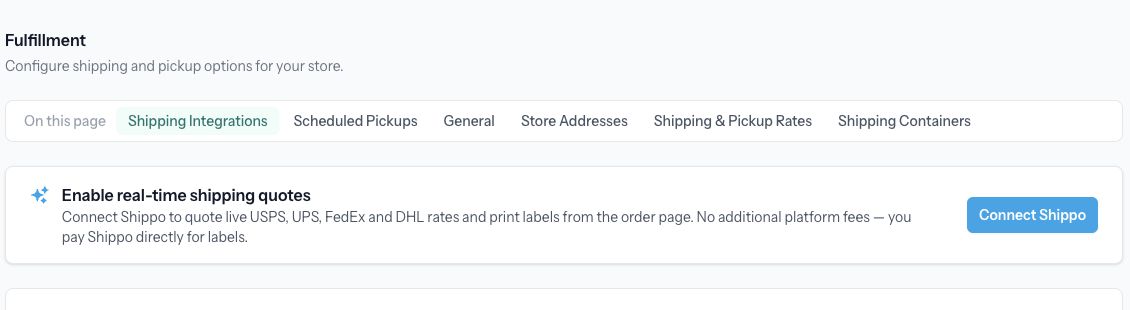
This screenshot shows the entry point before Shippo is connected.
Add shipment details
In General, choose your measurement units. Under Store Addresses, enter the actual Shipping From address. It can differ from your pickup location.
Under Shipping Containers, choose Add Container and enter the box dimensions and maximum weight. Define containers you actually use. Review packing efficiency so the calculation leaves appropriate room for packaging.
For each physical product, open Inventory & Shipping → Edit Shipping Properties and supply its weight and dimensions. Review variant-specific properties when variants differ. Add country-of-origin and customs information when needed for the destinations you serve.
Create a live-rate option
- In Shipping & Pickup Rates, choose Add Rate.
- Select Live rates via Shippo, available after connecting Shippo.
- Enter a customer-facing display name and choose the carrier/service settings offered in the dialog.
- Select the countries you serve.
- Enable the required dimension constraints and select at least one allowed container.
- Save the rate and then save the fulfillment settings.
Check checkout availability
Test with a representative product and a destination you intend to serve. A live option may be absent if measurements are missing, no allowed box fits, a weight limit is exceeded, the destination is excluded, or the carrier cannot return a rate.
Shipping-option order-value thresholds use the cart total after discounts. Check a discounted cart as well as a full-price one.
A quote at checkout is separate from purchasing a shipping label. Review the label details and cost from the order workflow before purchasing postage.
Related: Manage store fulfillment.Shippo provides live carrier quotes based on the destination and shipment. A complete setup needs a Shippo connection, an origin address, product shipping data, containers, and a live-rate option.
Connect Shippo
- Open Commerce → Fulfillment.
- Under Shipping Integrations, choose Connect Shippo.
- Complete the connection with your Shippo account and return to Articulation.
- Review the available carriers and services. Refresh carrier information if you have changed the carriers connected in Shippo.
This screenshot shows the entry point before Shippo is connected.
Add shipment details
In General, choose your measurement units. Under Store Addresses, enter the actual Shipping From address. It can differ from your pickup location.
Under Shipping Containers, choose Add Container and enter the box dimensions and maximum weight. Define containers you actually use. Review packing efficiency so the calculation leaves appropriate room for packaging.
For each physical product, open Inventory & Shipping → Edit Shipping Properties and supply its weight and dimensions. Review variant-specific properties when variants differ. Add country-of-origin and customs information when needed for the destinations you serve.
Create a live-rate option
- In Shipping & Pickup Rates, choose Add Rate.
- Select Live rates via Shippo, available after connecting Shippo.
- Enter a customer-facing display name and choose the carrier/service settings offered in the dialog.
- Select the countries you serve.
- Enable the required dimension constraints and select at least one allowed container.
- Save the rate and then save the fulfillment settings.
Check checkout availability
Test with a representative product and a destination you intend to serve. A live option may be absent if measurements are missing, no allowed box fits, a weight limit is exceeded, the destination is excluded, or the carrier cannot return a rate.
Shipping-option order-value thresholds use the cart total after discounts. Check a discounted cart as well as a full-price one.
A quote at checkout is separate from purchasing a shipping label. Review the label details and cost from the order workflow before purchasing postage.
Related: Manage store fulfillment.