
Sell Digital Downloads
Upload protected files, set download limits, and check that customers can buy and receive your digital products.
Sell ebooks, templates, audio, and other downloadable files as a digital product. A product can contain more than one file.
Before you start
Connect a payment processor in Commerce and use a site plan that includes digital products. Have the final files ready to upload. A product image is a storefront preview; it does not replace the downloadable file.
Create the product and upload files
- Open Commerce → Products and choose Create Product, or open an existing digital product.
- In Basics, enter a clear name and choose Product (Digital) under Type.
- Under Downloadable Files, choose Add File(s) and select the files buyers should receive. Wait for each upload to finish.
- Review the uploaded file list. Use its preview controls to check the files, and arrange them in the order customers should see them.
- Add a description explaining the file formats, what is included, and any software the buyer needs.
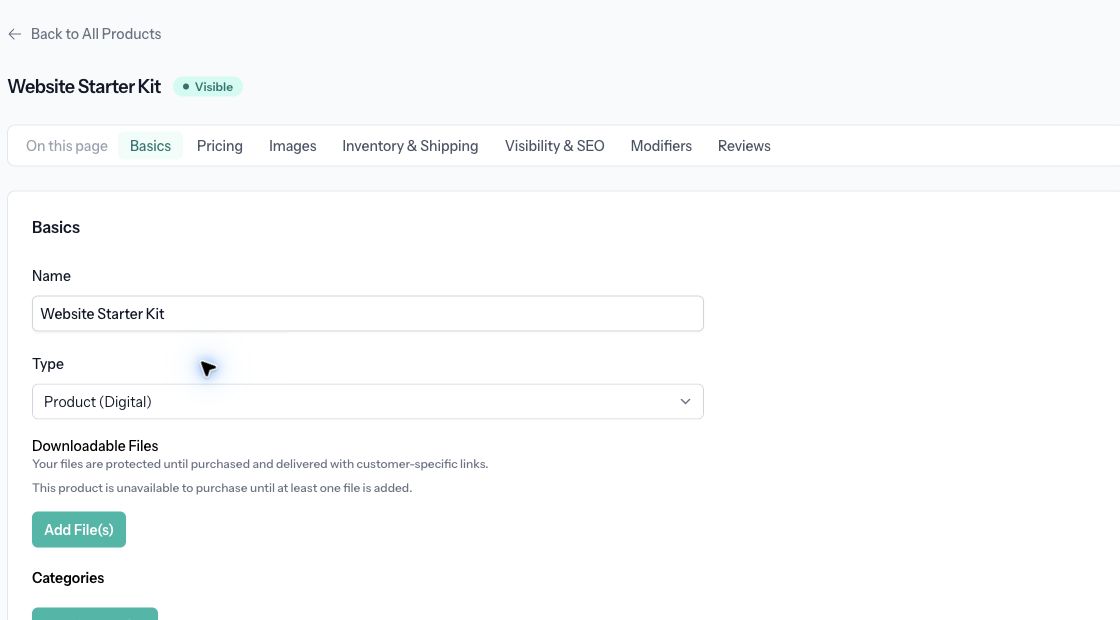
The sample product has no files yet. A digital product remains unavailable to purchase until at least one file is added.
Set pricing and availability
Enter the price in Pricing, then add storefront images in Images. In Inventory & Shipping, turn on Limit Downloads if you want to restrict repeat downloads and enter the allowed count. Use Limit per Order if buyers should only purchase a certain quantity at once.
Under Visibility & SEO, enable Product Available to allow purchases and Product Visible to show the product in lists and categories. Select Save. Use View & Edit to review the product page, and add it to a category or link to it from your site.
Check delivery
Customers receive protected, customer-specific download links after purchase. Keep the downloadable files in the product's file area instead of linking directly to a public copy in the description.
If a product cannot be purchased, first check that an upload finished and at least one file is listed. Then check availability, stock limits, and the payment connection. If a buyer cannot download again, review the download limit before replacing files or asking them to purchase again.
Related: Create and manage products.