
Add a Slide Grid
Build a horizontal carousel of content cards with different item counts for each screen size.
The Slide Grid component displays several content items at once and lets visitors move through them horizontally. Each item can contain components such as text, an image, or a button.
Add items and content
- Select Add Content in the editor and drag Slide Grid from Media into your page.
- Select the component to open its options.
- Under Items, select Add to create another item.
- Select an item in the list, then use Add Content to fill it.
- Edit the components inside the item on the page.
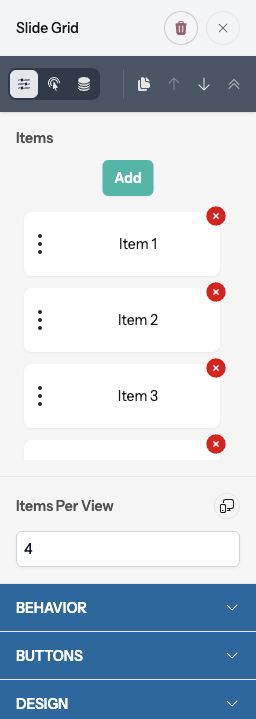
Drag an item’s handle in the list to change its position. Use its remove control to delete it and its contents. To return from an inner component to the grid, use the bottom breadcrumb or Select Parent Container.
Choose how many items are visible
Use Items Per View to set how many items appear together. Its device control lets you choose different values for desktop, tablet, and mobile. New grids start with four on desktop, two on tablet, and one on mobile.
Use fewer items per view when each card contains a lot of text. Check the smallest layout before publishing.
Control movement and styling
Under Behavior, turn on Autoplay if items should advance automatically. Interval (milliseconds) sets the delay; 5000 means five seconds. Autoplay is disabled while editing, so test it in Preview.
The navigation buttons move through items, and visitors can swipe on touch devices. Under Buttons, set Background and Button Text Color.
Under Design, adjust Gap, Shape, Background, and Border. Under Spacing, set Margin around the grid and Padding within it.
Preview and publish
Use Preview to test both arrows, swipe behavior, and autoplay if enabled. Confirm every item can be reached and that its contents fit at each screen size. Select Publish when ready.