
Transfer a Domain to Articulation
Move domain registration to Articulation and check the transfer through completion.
Transfer a domain when you want Articulation to manage its registration and future renewals. Connecting a domain changes where the website is hosted; transferring changes who manages the registration.
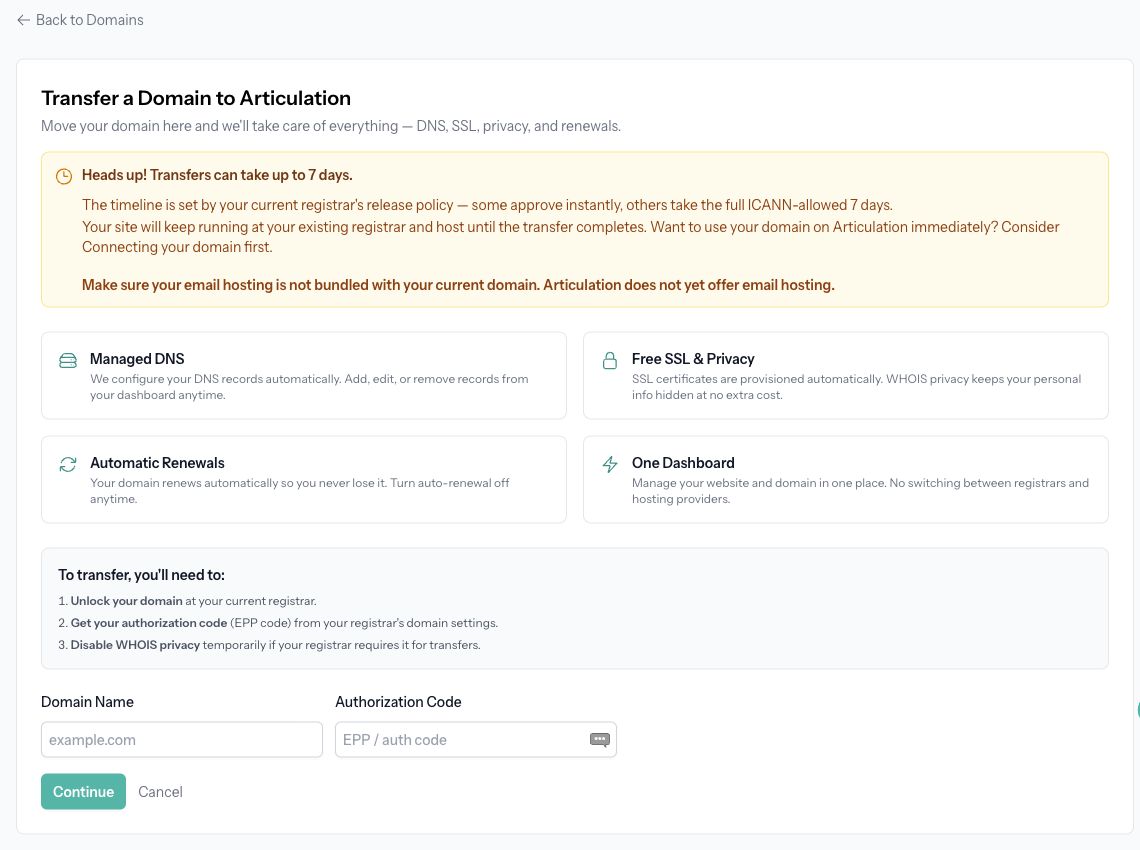
Prepare at your current registrar
Unlock the domain and obtain its authorization code, also called an EPP code. Follow the current registrar's requirements, including any privacy-setting changes it requires. Keep access to the domain's contact email.
Check whether your email service is bundled with the existing registration or hosting. Articulation does not supply email hosting, so arrange continued email service before changing providers.
If you want your Articulation website online before the transfer completes, connect your domain first.
Start the transfer
- Open Domain in your Articulation dashboard and choose the transfer option.
- Enter Domain Name and Authorization Code on Transfer a Domain to Articulation.
- Continue through the contact-information step. Use the contact on file or enter the correct registrant details.
- Complete any additional requirements shown for the domain extension.
- Review Confirm Transfer, including the domain and current fee, then click Purchase and Transfer and complete checkout.
The confirmation explains the renewal extension included in the transfer. Prices and supported extensions vary; use the details displayed for your domain.
Wait for completion
Transfers can take a few minutes to seven days, depending on the current registrar's release process. Check Domain for status. The website connection is completed automatically when the transfer finishes.
Do not cancel your domain registration at the old registrar while transfer is pending. If the transfer is rejected, check whether the domain remains locked or the authorization code is incorrect or expired, and follow the retry instructions shown.
After completion, check your published website and email service. Future renewal and DNS management are available in Articulation's domain management screen.